Email Deliverability (SPF, DKIM, DMARC)
Have you ever emailed a customer and had it land in their spam folder — or not arrive at all? That's usually a deliverability issue. The good news: it's almost always fixable with three small DNS records. No code, no technical skill needed — this page tells you what they are and how to check them.
What the three records do
Think of email like a letter with a return address:
- SPF — the doorman. It lists which servers are allowed to send mail from your domain. If a server isn't on the list, the mail looks suspicious.
- DKIM — the signature. It cryptographically signs your emails so receivers can confirm they really came from you and weren't tampered with.
- DMARC — the policy. It tells receivers what to do if an email fails SPF or DKIM — for example, "put it in spam" or "reject it." This is what actually protects your domain from being impersonated.
Most hosting providers manage these automatically when you set up email. For most people, you won't need to touch them — but it's good to know where to look.
Where to check them in your control panel
If your domain's DNS is managed in your control panel, the email records are set up for you.
- Log in to your control panel.
- Go to DNS and select your domain — you'll see the records for it.
- Look for the records listed below.
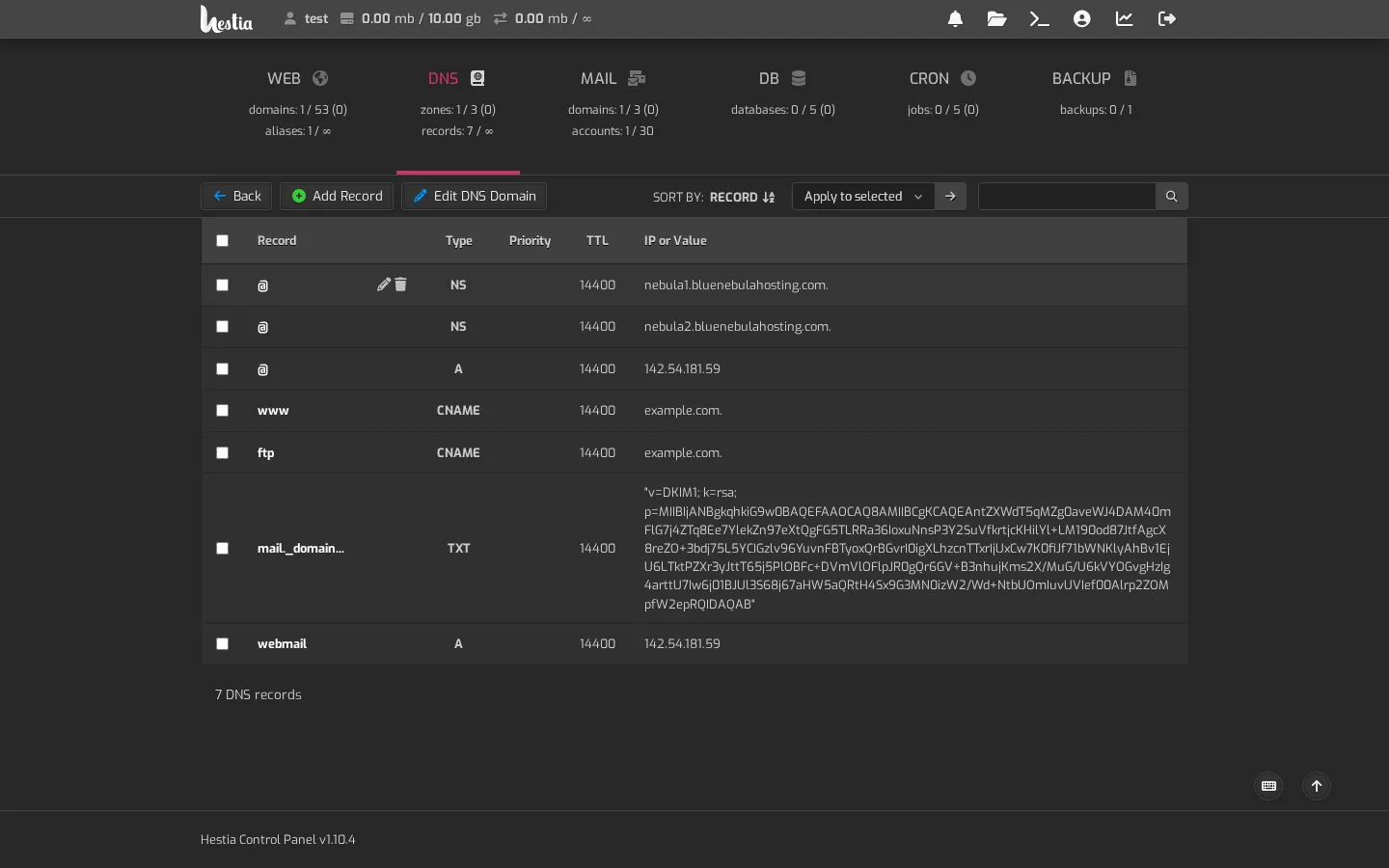
You'll typically see:
- SPF — a
TXTrecord for your domain (often shown as the@record). It looks likev=spf1 mx ~allor similar. - DKIM — a
TXTrecord with a name likemail._domainkey, whose value starts withv=DKIM1;. That's the signature. - DMARC — a
TXTrecord with a name like_dmarc, whose value starts withv=DMARC1;. This is the policy.
If email is going to spam
- Confirm the records exist — check the list above in your control panel. If your domain uses our nameservers, they're normally already there.
- Give it time — record changes can take up to 48 hours to spread.
- Send a test — send from your real address to a Gmail or Outlook address and check whether it lands in the inbox or spam.
- Still going to spam? Contact support and mention you've checked SPF, DKIM, and DMARC. The more you can tell us, the faster we can help.
A note about sending from tools like your board or CRM
Records like SPF, DKIM, and DMARC only cover servers you control through your hosting. If you send mail from a third-party service — a booking system, a form plugin, a contact form on your site — that service may need its own SPF/DKIM set up too. Check with them if your mail to customers is landing in spam.
Remember: deliverability is about trust. The more your domain proves "yes, this really is us sending," the more likely your emails land in the inbox.